
Last updated on
Nov 9, 2026

NGB Form 900 2019 free printable template
We are not affiliated with any brand or entity on this form

Fill out
Complete the form online in a simple drag-and-drop editor.

eSign
Add your legally binding signature or send the form for signing.

Share
Share the form via a link, letting anyone fill it out from any device.

Export
Download, print, email, or move the form to your cloud storage.
Why pdfFiller is the best tool for your documents and forms


End-to-end document management
From editing and signing to collaboration and tracking, pdfFiller has everything you need to get your documents done quickly and efficiently.
Accessible from anywhere
pdfFiller is fully cloud-based. This means you can edit, sign, and share documents from anywhere using your computer, smartphone, or tablet.
Secure and compliant
pdfFiller lets you securely manage documents following global laws like ESIGN, CCPA, and GDPR. It's also HIPAA and SOC 2 compliant.
What is NGB Form 900
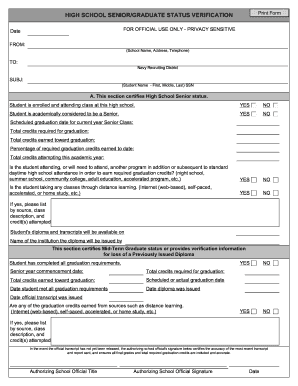
The High School Verification Form is a legal document used by the US Army National Guard to verify the status of high school juniors or seniors for training purposes.
pdfFiller scores top ratings on review platforms




Who needs NGB Form 900?
Explore how professionals across industries use pdfFiller.

NGB Form 900 is needed by:
-
School officials verifying student eligibility
-
Students applying for training exemptions
-
Parents or guardians giving consent for training
-
Recruiters or representatives assisting students
-
Educational institutions maintaining compliance
-
Guardians supporting access to educational resources
Comprehensive Guide to NGB Form 900
What is the High School Verification Form?
The High School Verification Form, also known as NGB FORM 900, is crucial for verifying the eligibility of high school juniors or seniors for military training. This form ensures that students can miss school for training while maintaining academic integrity. Involved parties include school officials, students, parents or guardians, and recruiters, each playing a vital role in the completion and validation of the form.
Purpose and Benefits of the High School Verification Form
This form serves as a critical tool for students aiming to participate in military training programs. Benefits include obtaining necessary verification, which permits students to temporarily leave school for training without academic penalties. It also stresses the importance of gathering consent from all parties involved to ensure the form’s legitimacy, reinforcing careful documentation of the student’s status.
Who Needs the High School Verification Form?
The High School Verification Form must be signed by several specific parties: school officials, students, parents or guardians, and recruiters. Scenarios requiring this form include military training commitments and educational programs where students may need to demonstrate school authorization and parental consent.
How to Fill Out the High School Verification Form Online: Step-by-Step Instructions
Completing the High School Verification Form online is straightforward. Follow these step-by-step instructions:
-
Access the online form and begin by entering the student’s name in the designated field.
-
Fill in the necessary data, such as school details and signatures from required parties.
-
Ensure all fillable fields are completed, particularly checkboxes that denote consent.
-
Review all entries for accuracy before submission.
Common Errors and How to Avoid Them
When filling out the High School Verification Form, users often encounter several common pitfalls. Frequent mistakes include:
-
Missing signatures from required signatories.
-
Leaving fields incomplete or incorrectly filled.
To prevent these errors, it’s advisable to double-check all information and signatures prior to final submission.
Submission Methods and Delivery of the High School Verification Form
After filling out the High School Verification Form, users have several submission methods available:
-
Online submission through the designated platform.
-
Mailing the completed form to the appropriate office.
-
Delivering it in person to ensure prompt handling.
It is recommended to keep track of submissions and seek confirmation after sending to ensure proper processing of the form.
Security and Compliance for the High School Verification Form
Concerns regarding data security and privacy are paramount in handling the High School Verification Form. PdfFiller employs robust measures such as 256-bit encryption and adheres to GDPR compliance standards. This focus on security underscores the importance of securely managing sensitive information during the form handling process.
How pdfFiller Can Simplify Your High School Verification Form Process
Using pdfFiller significantly streamlines the process of managing the High School Verification Form. Users can take advantage of its capabilities for editing, filling out, and eSigning documents efficiently. Testimonials from satisfied users highlight their success in completing this form with ease and confidence.
Things to Remember After Submitting the High School Verification Form
Once the High School Verification Form has been submitted, users should be aware of the following follow-up activities:
-
Anticipate a confirmation of receipt from the relevant authority.
-
Check the status of the submission regularly to ensure it is processing correctly.
If any errors are discovered after submission, the process for correcting or amending the form should be understood to ensure compliance with requirements.
Get Started with Your High School Verification Form Today!
Emphasizing ease of use, efficiency, and security, pdfFiller offers an excellent solution for completing your High School Verification Form. Users can quickly create, fill, and eSign their forms online, promoting a hassle-free experience.
How to fill out the NGB Form 900
-
1.Access pdfFiller and locate the High School Verification Form by using the search function or entering the form name directly.
-
2.Once the form is open, familiarize yourself with the layout and available fillable fields.
-
3.Before filling out the form, gather essential information including the student's name, school details, and contact information for the other required signatories.
-
4.Begin by entering the student's name in the designated field. Ensure you include the last name, first name, and middle name as required.
-
5.Next, fill in the school information. Make sure to double-check the spelling and format for accuracy.
-
6.Navigate to the section that requires signatures. Identify where the school official, student, parent/guardian, and recruiter will need to sign.
-
7.Ensure all required fields are completed. Use checkboxes for consent and permissions as indicated in the form.
-
8.Review each section of the form to confirm that no information is missing or inaccurately filled out.
-
9.Once satisfied with the entries, save the completed form within your pdfFiller account for your records.
-
10.You can also download a copy or submit it via email directly through pdfFiller's platform as per your preference.

Who is eligible to complete the High School Verification Form?
Eligible individuals include high school juniors and seniors in good standing, along with their parents or guardians, and school officials who must verify student status.
Are there any deadlines for submitting this form?
Submission deadlines may vary by training session. It is advisable to submit the form well in advance to accommodate processing times required by the US Army National Guard.
What is the submission process for this form?
After completing the High School Verification Form, it can be submitted electronically if using pdfFiller. Alternatively, it can be printed and submitted physically to the relevant school or recruiting office.
What supporting documents are needed to accompany the form?
Typically, supporting documents include proof of the student's enrollment and good standing at the school, such as a transcript or report card, if required by the recruiting office.
What common mistakes should be avoided when filling this form?
Common mistakes include missing signatures, incorrect or incomplete student and school information, and failing to double-check for required fields that must be filled out.
How long does it take to process the High School Verification Form?
Processing times can vary; it's essential to submit the form as early as possible. Generally, allow for a few days to a week for processing based on the office workload.
Is notarization required for this form?
No, notarization is not required for the High School Verification Form. However, all necessary signatories must provide their signatures for the form to be valid.
NGB Form 900 Form Versions
Related Forms




Related Catalogs
Get the latest insights from our blog


If you believe that this page should be taken down, please follow our DMCA take down process
here
.
This form may include fields for payment information. Data entered in these fields is not covered by PCI DSS compliance.